- Go 100%
| Filename | Latest commit message | Latest commit date |
|---|---|---|
| .github/workflows | ||
| smtp-testing-server | ||
| testingdata | ||
| .gitignore | ||
| go.mod | ||
| go.sum | ||
| LICENSE | ||
| mailgun-driver.go | ||
| mailgun-driver_test.go | ||
| mailing.go | ||
| mailing_test.go | ||
| message.go | ||
| message_test.go | ||
| README.md | ||
| sendgrid-driver.go | ||
| sendgrid-driver_test.go | ||
| smtp-driver.go | ||
| smtp-driver_test.go | ||
| sparkpost-driver.go | ||
| sparkpost-driver_test.go | ||

A Golang package for sending emails using SMTP, SparkPost, SendGrid and MailGun
This project starts from a full copy from https://github.com/harranali/mailing. 22 Sep 2026.
Features
- Multiple File attachments
- Multiple recipients
- Multiple CC
- Multiple BCC
- HTML content type support
- Plain Text content type support
- Easy integration with smtp4dev testing server for development
- Multiple Drivers Support: SMTP, SparkPost, SendGrid and MailGun
Install
Here is how to add it to your project
go get github.com/harranali/mailing
Using specific driver
Here is how to use SMTP Driver
// initiating the mailer with smtp driver
mailer := mailing.NewMailerWithSMTP(&mailing.SMTPConfig{
		Host:     "localhost", //the SMTP server host
		Port:     25, // The Port
		Username: "",
		Password: "",
		TLSConfig: tls.Config{
			ServerName:         "localhost",
			InsecureSkipVerify: true, // (use true for development only) true accepts any certificate presented by the server
		},
	})
SMTP authentication mechanism
By default the driver selects the authentication mechanism dynamically: after
STARTTLS it reads the server's advertised AUTH capabilities and prefers
AUTH LOGIN (accepted by Microsoft Outlook/Office 365, Gmail, Amazon SES,
Mailgun, SendGrid, Postmark, ...), falling back to AUTH PLAIN for legacy
servers that only support it. This means Outlook/Office 365 accounts work out of
the box even though they reject AUTH PLAIN.
You can force a specific mechanism through the AuthMechanism field:
mailer := mailing.NewMailerWithSMTP(&mailing.SMTPConfig{
		Host:          "smtp.office365.com",
		Port:          587,
		Username:      "user@yourdomain.com",
		Password:      "your-password",
		AuthMechanism: mailing.AuthLogin, // AuthAuto (default) | AuthLogin | AuthPlain
		TLSConfig: tls.Config{
			ServerName: "smtp.office365.com",
		},
	})
Leaving AuthMechanism empty keeps the previous behavior of being fully
automatic and is backward compatible with existing configurations. AuthXOAuth2
is reserved as groundwork for OAuth2.
Here is how to use Spark Post Driver
// initiating the mailer with SparkPost driver
mailer := mailing.NewMailerWithSparkPost(&mailing.SparkPostConfig{
		BaseUrl:    "https://api.sparkpost.com",
		ApiKey:     "test-api-key",
		ApiVersion: 1,
	})
Here is how to use Send Grid Driver
// initiating the mailer with SendGrid driver
mailer := mailing.NewMailerWithSendGrid(&mailing.SendGridConfig{
		Host:     "https://api.sendgrid.com",
		Endpoint: "/v3/mail/send",
		ApiKey:   "API-KEY-HERE",
	})
Here is how to use Mail Gun Driver
// initiating the mailer with MailGun driver
mailer := mailing.NewMailerWithMailGun(&mailing.MailGunConfig{
		Domain: "your-domain.com",    // your-domain.com
		APIKey: "TEST-API-KEY", // your api key
		SkipTLSVerification true  // (set true for development only!) // true means accepts any tls certificate sent by the domain without verification
	})
Usage
Here is how to use it
// Initiate the package with SMTP Driver
mailer := mailing.NewMailerWithSMTP(&mailing.SMTPConfig{
		Host:     "localhost", //the SMTP server host
		Port:     25, // The Port
		Username: "",
		Password: "",
		TLSConfig: tls.Config{
			ServerName:         "localhost",
			InsecureSkipVerify: true, // (use true for development only) true accepts any certificate presented by the server
		},
	})

// Set the Sender email address
mailer.SetFrom(mailing.EmailAddress{
        Name: "from name", // name can be set to empty string ("")
        Address: "from@mail.com",
    })

// Set the Recipients email addresses
mailer.SetTo([]mailing.EmailAddress{
        // name can be set to empty string ("")
        {Name: "first to name", Address: "theFirstTo@mail.com"},
        {Name: "second to name", Address: "theSecondTo@mail.com"},
    })

// Set CC email addresses
mailer.SetCC([]mailing.EmailAddress{
        // name can be set to empty string ("")
        {Name: "cc name", Address: "cc1@mail.com"},
        {Name: "cc name", Address: "cc2@mail.com"},
    })

// Set BCC email addresses
mailer.SetBCC([]mailing.EmailAddress{
        // name can be set to empty string ("")
        {Name: "bcc name", Address: "bcc@mail.com"},
    })

// Set the subject
mailer.SetSubject("This is the subject")

// Set the body (pick one: either HTML or Plain Text)
mailer.SetHTMLBody("<h1>This is the email body</h1>")
// OR
mailer.SetPlainTextBody("This is the email body")

// Set the sttachments files
mailer.SetAttachments([]mailing.Attachment{
        {
            Name: "first file",
            Path: "./myfiles/first-file.jpg",
        },
        {
            Name: "second file",
            Path: "./myfiles/second-file.pdf",
        },
    })

// Send the email
err := mailer.Send()
if err != nil {
    panic(err.Error())
}
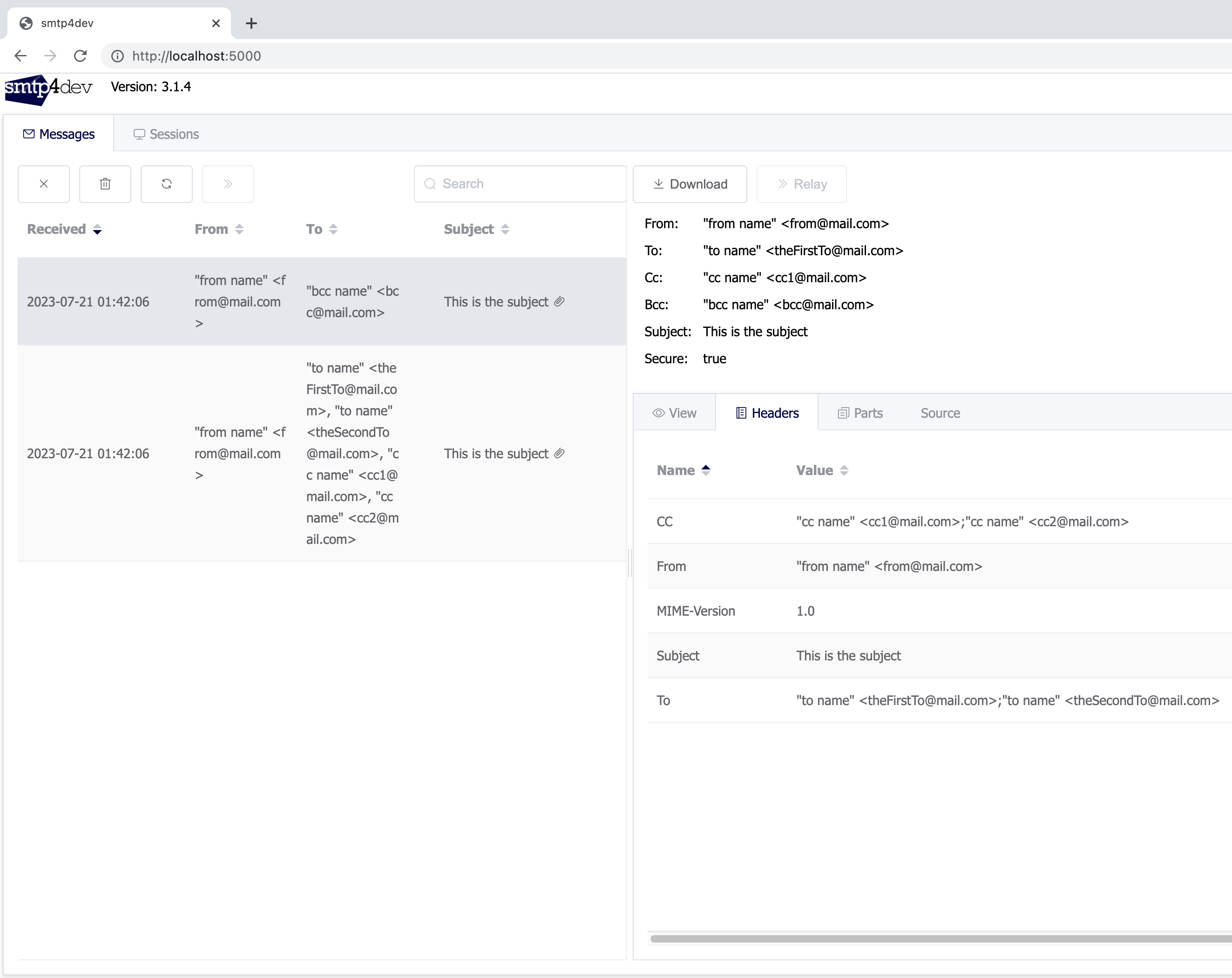
Testing you emails with smtp4dev SMTP Testing Server
While developing your app you might need to test your emails, for that a customized docker-compose.yaml from the SMTP testing server smtp4dev is included.
Running the testing server
Copy the docker-compose.yaml to your pc, then start the container by running
docker-compose up
The testing server configuration
Here is how to connect to the testing server
mailer := mailing.NewMailerWithSMTP(&mailing.SMTPConfig{
		Host:     "localhost", //the SMTP server host
		Port:     25, // The Port
		Username: "",
		Password: "",
		TLSConfig: tls.Config{
			ServerName:         "localhost",
			InsecureSkipVerify: true, // (use true for development only) true accepts any certificate presented by the server
		},
	})
Accessing the testing server UI
The testing server UI allows you to check the emails, here is a link to the ui of the testing server
http://localhost:5000